In-house tool · Video editing
An edit where the AI agent has its own signature
HEXART Video Edit is our video editor built in Rust. The editor and the AI agent (Claude Code via MCP) work on the same project at the same time. Each change made by the agent is a revision with its signature, which a person can undo with a single Ctrl+Z.
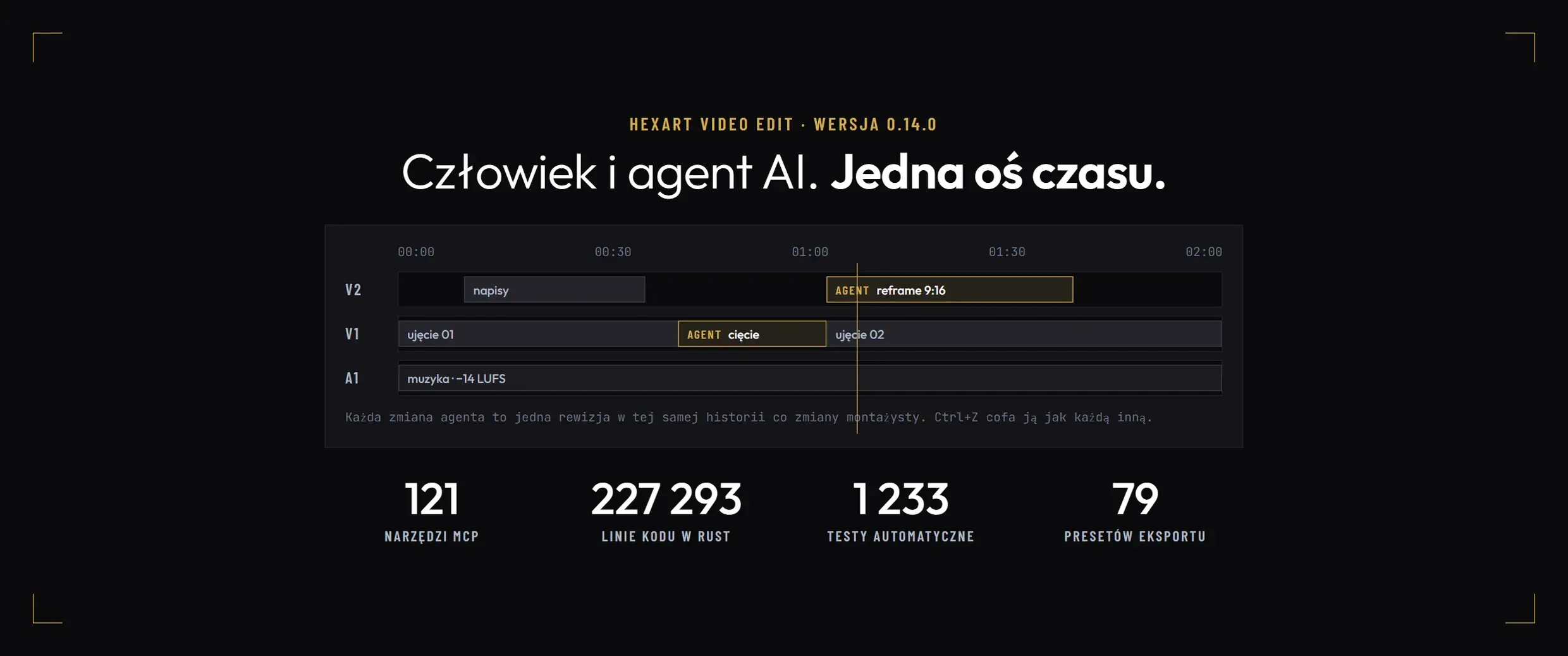
- Language
- Rust, 2024 edition
- Code
- 227,293 lines in 16 modules
- Automated testing
- 1 233
- MCP tools for the agent
- 121
- Export presets
- 79
- Commity
- 208 in 16 days
- Version
- 0.14.0 from 26 October 2026
- Platform
- Windows 11, GPU with DirectX 12
01Challenge
You need to be able to roll back an agent change.
An AI agent can now cut footage to music, create a vertical version and add subtitles. The problem starts when it works in the same project as an editor. Their changes get mixed together, and undoing one can break the other.
We built an editor with one rule in place from the first commit: the project changes only through commands recorded in a shared history, with an author listed for each entry.
02Solution
One change history for people and agents
-
One call, one revision
Each tool call by an agent creates exactly one revision, attributed to agent:client#number. The editor can see it in the history and undo it with a single Ctrl+Z.
-
Project copy plan
The operation is first planned against a project snapshot. If any step fails, the project remains unchanged, and the error reports the command number.
-
The agent only reverses its own actions
The agent’s undo command applies only to its most recent revision. It will not affect changes made by a person or another agent session unless the user explicitly asks.
-
Paid actions are pending approval
Image and video generation, transcription, file sending, publishing, deletion, and longer exports require confirmation in the editor window. In windowless mode, they are rejected.
Time measured in flicks
The timeline measures time in flicks: 705,600,000 units per second. A frame at 23.976, 25, 29.97, and 60 fps is always a whole number, so cuts land on frames without rounding errors.
03Agent
121 MCP tools
The agent connects via Model Context Protocol: a local HTTP server with a token and Host and Origin header checks, or via stdio. Connect it in Claude Code with a single command: claude mcp add hexart -- hve mcp --connect. The server also runs in the background, without an open window.
121 tools cover projects, media, timelines, effects, expressions, the audio mixer, web layers, markers, footage analysis, rotoscoping, track separation, generation, export, and file delivery. The agent sees the result of its work through the render_frame tool, which returns the exact frame as an image.
04Engine
A full editor, not a wrapper for FFmpeg
-
Export: 79 presets
MP4, MOV, MKV, WebM, MXF and AVI; H.264, HEVC, AV1, VP9, ProRes, DNxHR, CineForm, FFV1 and HAP; PNG, TIFF, OpenEXR and DPX sequences. NVENC, Quick Sync and AMF hardware encoding.
-
Integration with other software
Premiere XML, OpenTimelineIO and EDL. Live output via NDI. RAW footage from Blackmagic (BRAW) and RED (R3D) cameras via separate decoders.
-
Color on the GPU
Preview on wgpu and DirectX 12, composition in linear space, Rec.709, PQ and HLG output. Lift, gamma, gain and offset wheels, curves, HSL qualifier, waveform, vectorscope and histogram.
-
Sound
LUFS and true peak metering, effects on tracks and the master, VST3 and CLAP plugins with latency compensation, local stem separation using Spleeter and HTDemucs models.
-
Web layers and expressions
HTML, CSS, and JavaScript (GSAP, three.js, Lottie) rendered frame by frame in Chrome or Edge. Expressions in full JavaScript using the QuickJS-ng engine.
-
Captions and vertical format
Karaoke subtitles from ElevenLabs Scribe v2 transcripts and an automatic 9:16 frame that tracks faces.
05Measurement
290 seconds of music video in 38 seconds of export
Test on a music video with 90 elements, 289.9 s, at a resolution of 1536 × 656 px. Storyboard import took 9.4 s, and H.264 export with audio took 37.9 s, or 191 frames per second.
The preview rendered 500 out of 500 frames. Frame rendering took an average of 1.8 ms and no more than 5.5 ms in 95% of cases. Measurements were taken on the workstation used to develop the editor.
06How it came about
208 commits in 16 days
The first commit was made on 12 October 2026, and we tagged version 0.14.0 on 26 October. AI agents contributed to 187 of 208 commits: Claude Opus 5.5 to 186 and Claude Sonnet 5.5 to one. Scope, decisions and acceptance remain with the human.
Agent sessions run in parallel on separate branches. Each picks up a task from the list, and every module has an owner. Before merging, all checks must pass: formatting, clippy analysis with no warnings, tests, and build. Architectural decisions are recorded in a log that currently has 34 entries.
07Condition
Internal tool, not a product for sale
HEXART Video Edit is used in our production. There is no public version, pricing, or download page. We have not tested it on macOS, and the task list has 45 open items, including dotLottie archives and window tracking in color grading.
Questions and answers
Questions about HEXART Video Edit
Can an AI agent break an editing project?
Each agent call creates a revision in the same history as the editor’s changes, attributed to the agent. The call is first planned on a copy of the project, so if any step fails, nothing changes. A person can undo an agent’s change with a single Ctrl+Z.
How do I connect Claude Code to HEXART Video Edit?
With one command: claude mcp add hexart -- hve mcp --connect. The command starts the server in the background if it is not already running. The server listens only locally and requires a token.
Is HEXART Video Edit for sale?
No. This is a tool we use in our production work. It has no public version or pricing. We bring the same approach, an AI agent working alongside a person with a single change history, to our clients’ tools.
Do you want an AI agent in your editing workflow?
We build tools where an AI agent works alongside people, and every change it makes can be undone. Describe your workflow.
Schedule a workshop with Paul
Choose thirty minutes or a full workshop. Book a time slot in the calendar, receive immediate confirmation.